Textastic Code Editor

Leistungsstarker Code-Editor für iOS

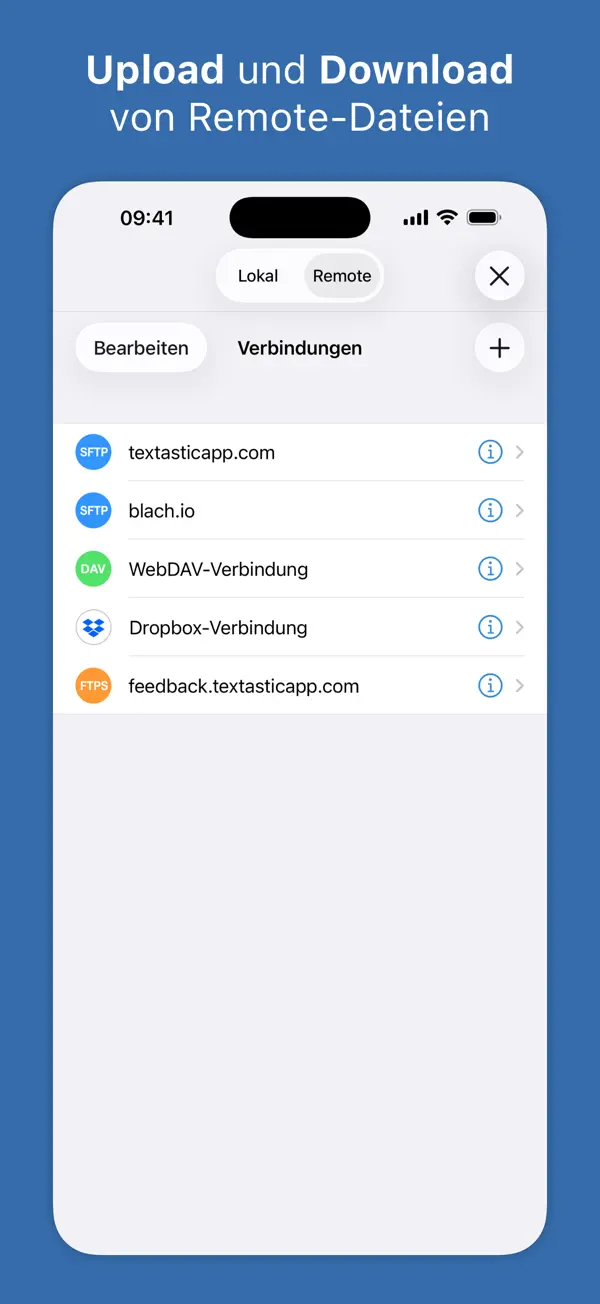
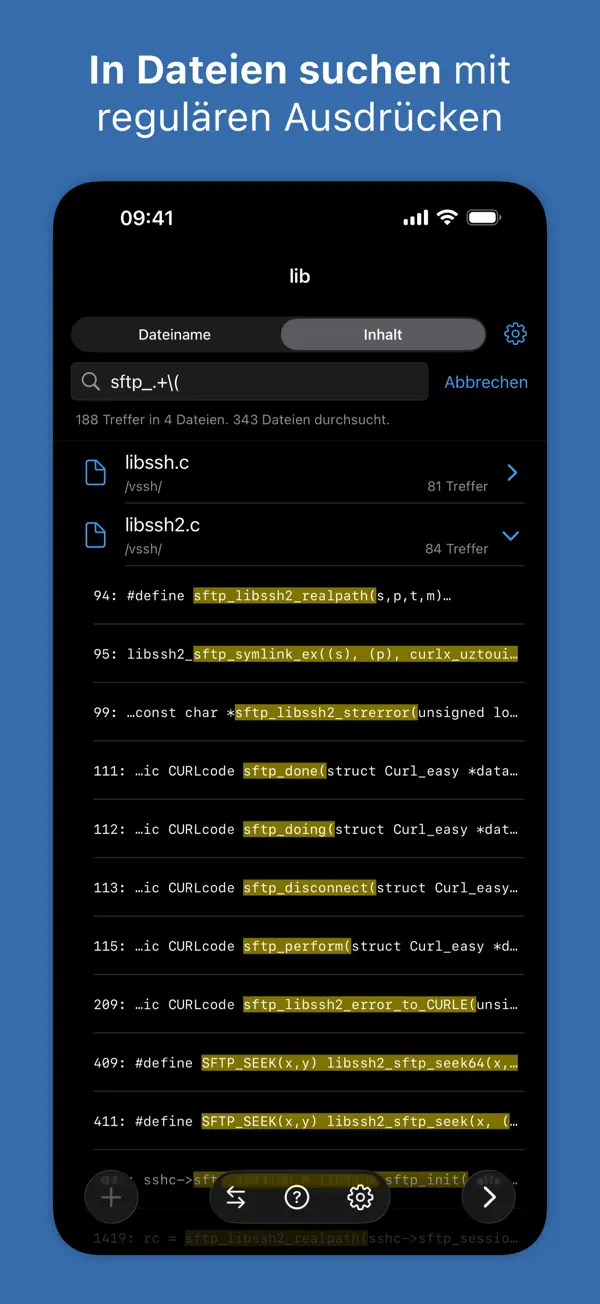
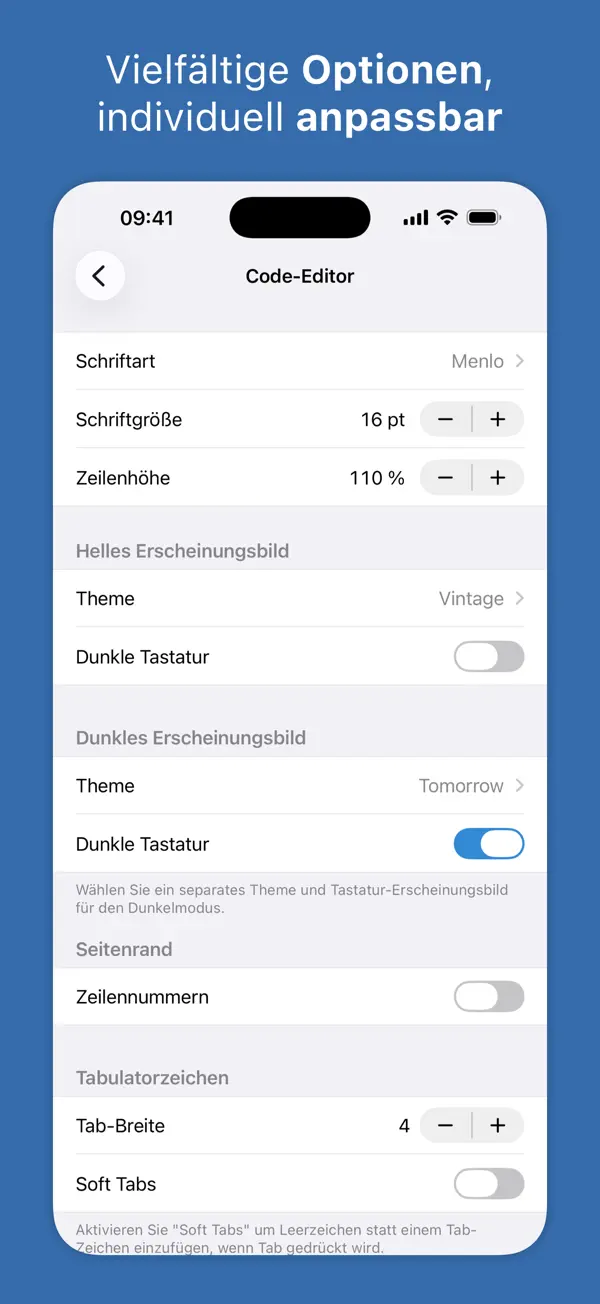
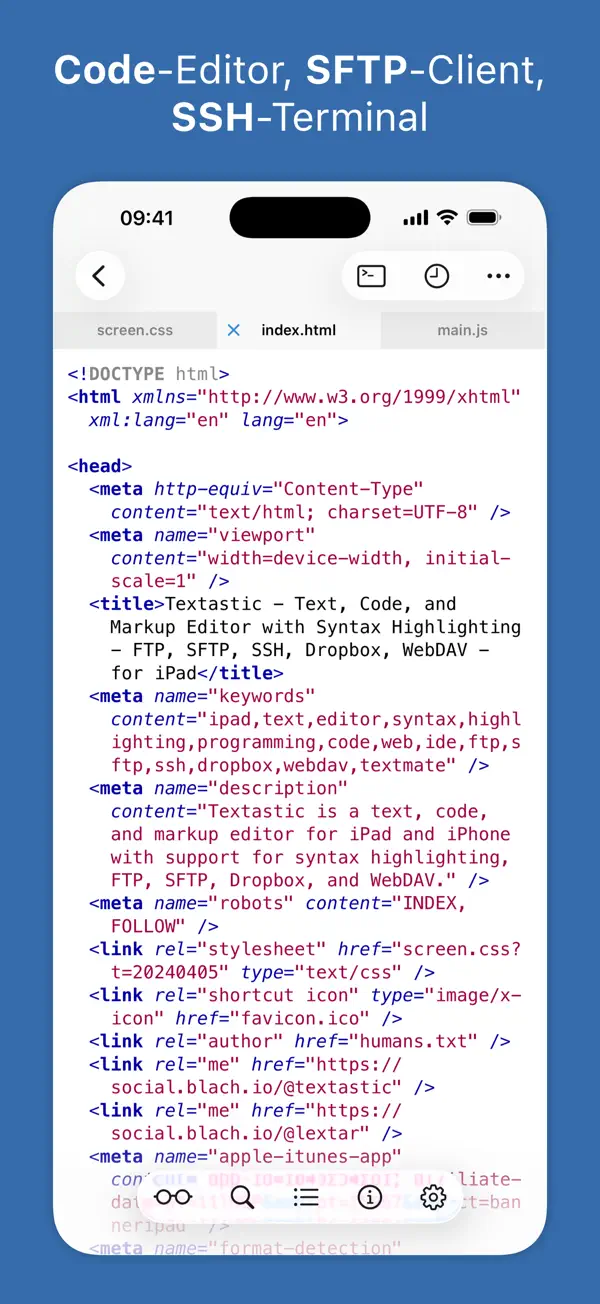
Textastic ist ein professioneller Code-Editor für iPhone und iPad mit Syntax-Highlighting für über 80 Sprachen. FTP/SFTP-Upload, Git-Integration über Working Copy und ein komfortables Keyboard machen mobiles Coding möglich.
Perfekt für dich, wenn ...
Du programmierst unterwegs auf dem iPhone oder iPad und brauchst Syntax-Highlighting
Du willst Dateien direkt per FTP/SFTP auf deinen Server hochladen
Eher nicht, wenn ...
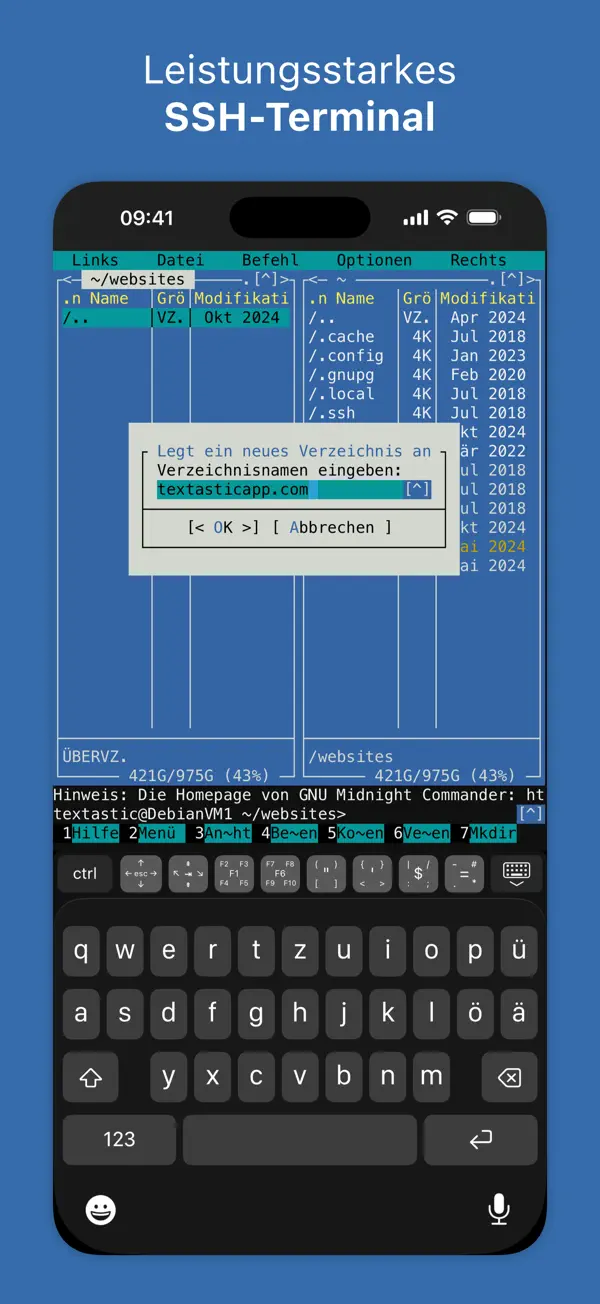
Du willst Code direkt im Terminal ausführen
Du suchst eine kostenlose Code-Editor-Lösung

Die letzten zehn Bewertungen liegen bei Ø 2,4 und damit auf dem Niveau der vorangegangenen (Ø 2,4). Im deutschen App Store gibt es noch keine Rezensionen, die Zahlen stammen aus dem US-Store.

5★
13
4★
0
3★
5
2★
6
1★
25
1.1K Bewertungen insgesamt ~11 Jahre
4,7
Die neusten 49 Bewertungen ~1 Jahr
2,4
Die neusten 10 Bewertungen ~3 Monate
2,4

Die hilfreichsten 6 der neusten 49 Bewertungen

vor 1 Monat Best All Around Code Editor on iPad

Please do not let this app die and become another software developer’s “if only”. Dev tools on the iPad are so limited and I cannot describe the gratitude I have that this exists. PRETTY PLEASE KEEP THIS GOING AND ONLY IMPROVING

vor 2 Monaten Seems like an amazing app… but paywall

This seems like an amazing app based on everything I've seen, but everything is locked behind a paywall. Including viewing, creating, and editing code files, which is literally the purpose of a code editor. I wish the pro subscription were less of a necessity and more of an optional upgrade for advanced features. Granted, it's only $20 a year, but it's still something to be aware of before downloading.

vor 4 Monaten My favorite editor!

I've tried all the code editors for iPad, and Textastic is definitely the best. I use the app to update my website from my iPad Pro. With web preview and SFTP built in, it's almost easier than working on my MacBook. Keep up the great work!

vor 8 Monaten Powerful text and code editor

Textastic is a great code and text editor. It has syntax highlighting for a *lot* of languages, including both programming (C/C++, Python, Rust) and text (LaTeX). Good ability to manage files in iCloud, which makes it a useful tool for editing files sync’ed to the cloud from your laptop. It also interacts well with tools such as Working Copy, so you can edit code on your iPad, commit it, and run a build pipeline. There’s one glaring feature missing, though: code folding. If the author adds this feature, I’d never consider using another code editor.

vor 9 Monaten Literally does NOTHING without Pro

Nowhere in the description is there any mention of a purchase or subscription cost. I don’t object to these things, if an app works and does something I need I don’t mind paying. That said, I want to know what I’ll be paying, and if it does what I need. BEFORE paying. I think that’s only reasonable. I managed to import a file. Then it was all blurred out with a message to get Pro for viewing and editing. It’s a text editor. Viewing and editing are not optional additional features. They are the key features. What good is a text editor what won’t even let me view let alone edit a file? How can I make an informed decision if I have absolutely no information? This could be an amazing app. I’ll never know. Because I’m so dissatisfied with the circumstances I’ve mentioned.

vor 1 Jahr Great for the niche it fills

If I need syntax highlighting, this is my go-to app. For composition with reliable and extended undo/redo capability and customization, Drafts is my go-to app. For whatever quirks this app might have, it does not charge me for a subscription, honoring my pro purchase from years ago instead. It's there when I need it, which is only sometimes. I don't use the ftp and ssh parts of the app, so I can't comment on them. I do use iCloud as well as the standard share sheet.

Basierend auf Rezensionen aus dem US App Store (im deutschen Store liegen noch keine vor) · Stand: September 2026

Einmalkauf (ca. 10 €) — Code-Editor für iPhone und iPad, einmal kaufen, dauerhaft nutzen.

Alexander Blach

Solo-Indie-Entwickler von Textastic, einem fortschrittlichen Code-Editor für iOS und Mac mit Syntax-Highlighting für 80+ Dateitypen, SSH, FTP/SFTP und WebDAV-Unterstützung. Kein Abo-Modell, kein Tracking.

Typ: Einzelentwickler Sitz: Oerlenbach, Deutschland Gegründet: 2016 textasticapp.com
Nach unseren Recherchen sind keine Vertrauens- oder Sicherheitsvorfälle bekannt.
Im App Store seit 12. März 2016
Größe 26 MB
Mindest-iOS iOS 16.0
Altersfreigabe 4+
Geräte iPhone & iPad
Sprachen 2 Sprachen
Aktuelle Version v10.9.8 vom 5. September 2026

- Es wurde ein seltenes Problem behoben, bei dem zur Datei gehörige Systemressourcen aktiv bleiben konnten, wenn ein Editor-Tab geschlossen wurde, bevor die Datei vollständig geöffnet war.

- Es wurde ein Problem behoben, bei dem das Löschen lokaler Dateien unter zukünftigen Betriebssystemversionen fehlschlagen konnte.

Kaum bekannt, aber Textastic ist für Entwickler, die gelegentlich auf dem iPad coden wollen, die ehrlichste Option: kein Abo, Einmalkauf, 80+ Sprachen.

Ohne integriertes Terminal ist echter Workflow-Einsatz eingeschränkt – Working Copy als Git-Companion wird fast immer nötig. Wer vollständiges mobiles Coding braucht, sollte die Grenzen kennen.

Häufige Fragen

Was ist Textastic Code Editor?
Textastic Code Editor ist eine iOS-App in der Kategorie Entwickler-Tools. Leistungsstarker Code-Editor für iOS
Ist Textastic Code Editor kostenlos?
Ja, Textastic Code Editor ist komplett kostenlos im App Store erhältlich.
Was sind die Vorteile von Textastic Code Editor?
Die wichtigsten Stärken von Textastic Code Editor: Syntax-Highlighting für 80+ Sprachen. FTP/SFTP-Upload integriert. Gute externe Tastatur-Unterstützung.
Welche Nachteile hat Textastic Code Editor?
Mögliche Schwächen: Kein integriertes Terminal. Einmalkauf, aber selten im Sale.
Ist Textastic Code Editor vertrauenswürdig?
Ja, Textastic Code Editor gilt als vertrauenswürdig. Indie-Entwickler, Einmalkauf, keine Werbung, keine Datenerfassung bekannt.

Ähnliche Entwickler-Tools-Apps

Sehr gut · 4,7★
Gratis
Scriptable

Scriptable

Entwickler-Tools

JavaScript-Automatisierung für iOS: Widgets, Shortcuts und Scripts

Sehr gut · 4,7★ Gratis

JavaScript-Automatisierung für iOS: Widgets, Shortcuts und Scripts

Sehr gut · 4,7★ (3.2K) Gratis
Details ansehen → Kostenlos laden
Sehr gut · 4,8★
Freemium
Working Copy - Git client

Working Copy - Git client

Entwickler-Tools

Vollwertiger Git-Client für iPhone und iPad
Sehr gut · 4,8★ Freemium

Vollwertiger Git-Client für iPhone und iPad

Sehr gut · 4,8★ (1.1K) Freemium Klassiker
Details ansehen → Kostenlos laden
Sehr gut · 4,8★
Freemium
SSH Client - Secure ShellFish

SSH Client - Secure ShellFish

Entwickler-Tools

Blitzschneller SSH-Client mit Remote-Dateimanager und Shortcuts-Integration.
Sehr gut · 4,8★ Freemium

Blitzschneller SSH-Client mit Remote-Dateimanager und Shortcuts-Integration.

Sehr gut · 4,8★ (682) Freemium
Details ansehen → Kostenlos laden
Sehr gut · 4,6★
Freemium
Runestone Text Editor

Runestone Text Editor

Entwickler-Tools

Leichtgewichtiger Code-Editor für iPhone und iPad

Sehr gut · 4,6★ Freemium

Leichtgewichtiger Code-Editor für iPhone und iPad

Sehr gut · 4,6★ (439) Freemium
Details ansehen → Kostenlos laden
Sehr gut · 4,9★
Gratis
a-Shell

a-Shell

Entwickler-Tools

Vollwertiges Unix-Terminal fürs iPhone – mit vim, git, curl, grep und mehr.

Sehr gut · 4,9★ Gratis

Vollwertiges Unix-Terminal fürs iPhone – mit vim, git, curl, grep und mehr.

Sehr gut · 4,9★ (192) Gratis Geheimtipp
Details ansehen → Kostenlos laden
Alle Apps
Zuletzt geprüft: Oktober 2026
Kostenlos laden